

 This powerful News EA for MT4 is a professional MetaTrader expert advisor designed for high-impact forex news trading. It uses a smart One Cancels Other (OCO) strategy to automatically manage pending orders and can trail winning positions during volatile news events, helping traders capture big moves while controlling risk.
- Automatically places multiple buy-stop and sell-stop pending orders above and below the current price just before major forex news releases
- Uses intelligent OCO (One Cancels Others) logic — instantly deletes opposite pending orders as soon as one is triggered
- Supports full risk management with stop-loss, take-profit, trailing stop, and break-even features
The RobotFX News EA is a specialized MetaTrader expert advisor built for news trading on MT4. Using the powerful OCO (One Cancels Others) method, it allows traders to prepare for high-volatility events like NFP, interest rate decisions, or CPI releases without the stress of manual execution.
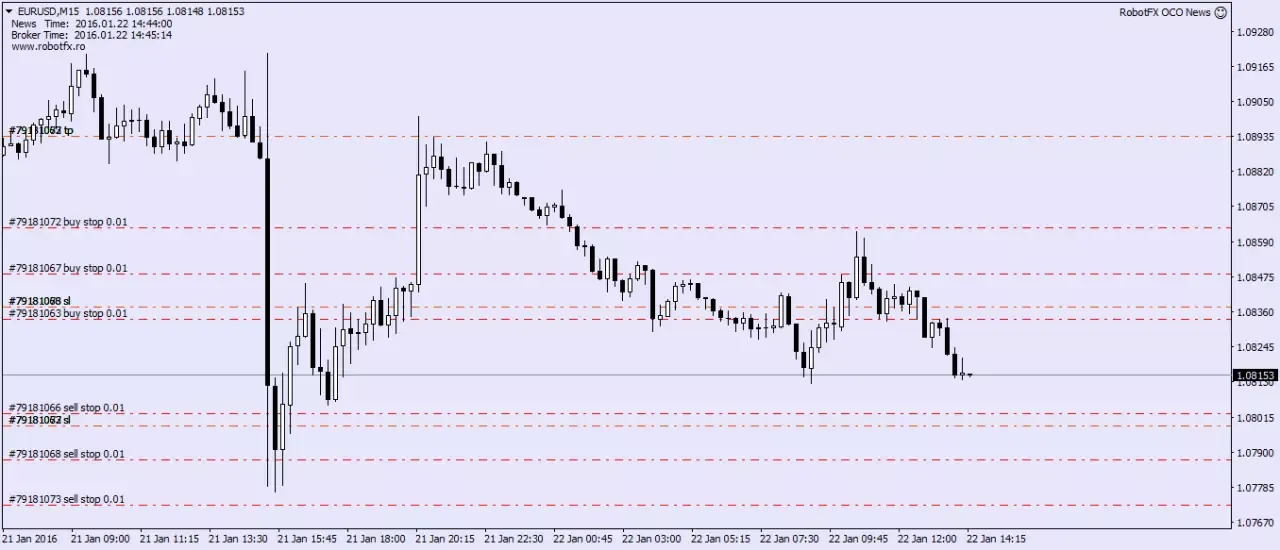
Before major news, the EA places pending orders on both sides of the market. Once the price breaks in one direction and triggers an order, the EA automatically cancels all opposite pending orders, protecting your account from unwanted trades while letting the winning position run.
|
|
|
The RobotFX News EA stands out among other MetaTrader news expert advisors by supporting multiple pending orders at customizable distances. This gives traders maximum flexibility for different news trading strategies while maintaining strong risk management through stop-loss, take-profit, breakeven, and trailing stop features.
 |
| OCO news allows the creation of more than 2 pending orders, just before forex news release |
- Enter your Client Email - fill this with your email IF you are using a paid version of this EA on a LIVE account
- Change to news time - enter here the date/time when the news will happen (you can find this on numerous forex sites, such as ForexFactory or DailyFX)
- Place pending orders (minutes before news) - enter the number of minutes before the news, when the EA will place the pending order(s); use decimals for seconds
- Delete pending orders (minutes after news) - enter the number of minutes after the news release when the EA will start deleting the pending orders from the chart
- Enable OCO (one cancels others) - set to true if you want the news EA to start deleting opposite pending orders as soon as the first pending order becomes active
Example: if the price will hit a pending buy order, the EA will attempt to close the sell pending orders
- Trades of each kind - set the number of pending sells and buys allowed by the EA to open
- The distance between them (pips) - this is the distance between the trades of the same kind
- Distance from current price (of first pending order) - the distance (at the forex news release time), where the EA will place the first opposite trades (ie 1st buy and 1st sell)
- Stop-loss (in pips, from current price) is the distance where the EA will place the stoploss for the pending orders it opens
- Take-profit (in pips, from first order) is the distance, in pips, where the EA will place the takeprofit, relative to the price level of the 1st order
- TrailingStop/BreakEven - as soon as the price reaches this distance in pips, from a positive profit trade, the EA will place the stoploss at breakeven, and if the price will continue in the trader's favor, the SL will continue to move (ie trailing stop)
- TrailingStep - the step (number of pips) the price has to move in favor of a positive trade for the EA to consider dragging the stoploss so it wil be place at the TrailingStop distance (above) away from the price at that moment
- Slippage - applies to both placing the pending orders and trailing the price and it is measured in pips
- MagicNumber - used to restrict the EA to monitor only trades with this number, in case the trader wants to open/manage other trades on a similar chart
- Download and install the News EA on your MetaTrader 4 or MetaTrader 5 platform.
- Attach the EA to a major forex pair chart (EURUSD, GBPUSD, USDJPY recommended).
- Set your preferred news time and pending order parameters in the EA settings.
- Enable OCO mode and configure your risk management (Stop Loss, Take Profit, Trailing Stop).
- Before high-impact news, the EA will automatically place the pending orders.
- After the news, monitor the EA as it manages the trade and cancels opposite orders.
Frequently Asked Questions
Q: Does the News EA work on MT4?
Yes, the RobotFX News EA is fully compatible with both MetaTrader 4 platforms.
Q: What is the OCO feature in this News EA?
OCO stands for One Cancels Others. When one pending order is triggered, the EA automatically deletes all opposite pending orders to avoid unwanted trades.
Q: Which news events are best for this EA?
High-impact news such as Non-Farm Payrolls (NFP), FOMC interest rate decisions, CPI, and GDP releases work best with this news trading expert advisor.
Q: Can I use this EA on any broker?
Yes, it works on most forex brokers. However, we recommend brokers with fast execution and low slippage for best performance during news.
Q: Is the News EA suitable for beginners?
Absolutely. The EA automates the complex part of news trading while giving you full control over risk parameters.





Please do not spam; comments and reviews are verified prior to publishing.