Auto Recovery EA for MT4 & MT5
MetaTrader Expert Advisor
Auto Recovery EA is a professional Forex hedging expert advisor for MetaTrader 4 and MetaTrader 5 designed to recover losing trades using a proven zone recovery strategy. Also known as an automatic loss recovery EA, hedge recovery robot or recovery zone trading system, this MT4 and MT5 trading robot automatically places opposite hedge positions to reduce drawdown, protect account equity and help traders recover trades without relying on traditional stop losses or risky martingale systems. The Auto Recovery EA supports both manual trading and automated forex strategies, making it suitable for traders looking for advanced hedge management, recovery trading and automated risk control on MT4 and MT5 platforms.
Added to cart — redirecting to checkout in 3 seconds... Alternative download link
Key Features of the Auto Recovery for MT4 & MT5
- Prevent losses by hedging open trades instead of relying on a stop loss
- Automatically close the trading basket when profit reaches breakeven or a set target
- Turn losing trades into winners by closing them and securing profits on the opposite positions
RobotFX Auto Recovery is a powerful MT4 and MT5 recovery expert advisor that recovers losing trades by opening one or more opposite positions using a proven zone recovery strategy. This feature is also part of the RobotFX Fluid EA, but you may also explore related recovery systems such as the Grid Expert Advisor for broader basket trading logic, or browse the full range of MetaTrader 4 Expert Advisors for more automated strategies focused on hedge and recovery trading. It is an effective way to transform losing trades into breakeven or profitable trades, without relying on stop losses or risky martingale strategies. The algorithm is based on Joseph Nemeth’s well-known zone recovery trading method, adapted for both MT4 and MT5 platforms.
Unlike traditional stop-loss systems that immediately close losing positions, the Auto Recovery EA converts trades into controlled hedge positions designed to recover losses when price breaks out of the recovery zone. This makes the EA suitable for forex traders looking for an alternative to stop-loss based trading systems and high-risk martingale recovery methods.
See the chart below to understand how forex zone recovery trading works in practice. The lot size of hedging orders is determined either by a multiplier set by the trader or by the recovery zone ratio combined with the take profit.

The lot size of pending hedging orders is automatically calculated so that overall profit increases as soon as price hits them and continues in that direction. Similar trade management logic is also used in systems like the NonLagMA Expert Advisor.
Auto Recovery EA Hedging Examples

In the trading chart above, the Auto Recovery EA is configured
to close all open trades once the total profit reaches
breakeven ($0). As shown, when a trade is opened, the EA
immediately places an opposite pending order with a larger lot size. If the
price triggers this hedging order and then moves in its favor, the
profit from the hedge trade offsets the first trade’s losses. At that point, the
EA automatically closes all active orders and removes the remaining pending
orders from the chart.
When breakeven profit is reached, Auto Recovery EA can also be set to close only
the losing trades while letting the profitable ones continue trailing,
effectively
converting losing trades into winners. Traders are encouraged
to test and download the EA to find the most effective hedging settings for
their forex trading strategy.
Configuring Auto Recovery Settings

- Client Email - fill this with your email IF you are using a paid version of this EA on a LIVE account
- Recovery Zone - the number of pips from the opened trade where you want the hedge order to be placed; technically it is the height of the recovery zone
- Take Profit has 2 functions:
- Normal take profit for the opened trades, if Close Trades At Take Profit is set to true and the real profit is bigger than Minimum Profit
- The ratio between this and the Recovery Zone can be used to calculate the next recovery trade order lotsize (Use Hedge Multiplier must be set to false). A ratio of 1:1 (for example RecoveryZone 50, TakeProfit 50) will make the hedging order to be double the size of the previous/initial order
- Hedge Multiplier - IF Use Hedge Multiplier is set to true, this is the multiplier used to calculate the size of the next hedging order, based on the previous one(s)
- Hedge Last Order LotSize - if enabled, it will set the hedging lotsize based on the last order lotsize instead of considering the entire baskets of opposite trades
- Maximum Orders - the maximum number of recovery trades allowed to be opened by the EA; use as a safety measure to restrict the EA opening too many trades, such as when a consolidation zone occurs
- Minimum Profit - minimum profit which, once reached, allows the EA to close a basket of trades (see Close All Opened Trades) or a trade at Take Profit level (although at this point the profit should already be higher than Minimum Profit)
- BreakEven - once the price will move in your favor this number of pips (away from the opening price), the EA will set the stoploss at the trade opening price
- Use Hedge Multiplier - whether or not to use a lotsize multiplier for the hedging orders, instead of the ratio between the Recovery Zone and the Take Profit
- Hedge Multiplier - the lotsize multiplier for the hedge orders, if the Use Hedge Multiplier is set to true
- When Minimum Profit is Reached - choose what to do when the basket profit reaches the Minimum Profit:
- Close All Opened Trades - once this profit is reached, the EA will start closing all opened trades on the chart. Set it to 0 if you want to close all trades at a cumulative break-even; however, please mind that between closing the first trade and the last one, the price might move and the profit (after close) might be slightly higher or lower than the MinProfit
- Close Losers & Set BreakEven - close the losing trades and place the stop-loss of the winning trades at a distance defined by the trader (see below)
- Do Nothing - self explanatory
- Trailing Stop for Close Losers & Set BE (pips) - if #2 is triggered (above), this will be the trailing-stop for the remaining (winners) opened trades
- Trailing Step for Close Losers & Set BE (pips) - if #2 is triggered (above), this will be the trailing-step for the remaining (winners) opened trades. Also, it defines the distance from the current price where the EA will place the stoploss (right after Close Losers & Set BreakEven will close the losing trades)
- Close Trades At Take Profit - close trades at Take Profit, if they are all profitable (ie profit > Minimum Profit)
- Close Trades At Maximum Orders - whether or not to allow the EA to close all orders when the Maximum Orders number is reached - will probably lead to some losses as the EA won't consider the profit and the Minimum Profit
- Slippage - the maximum distance, in pips, allowed for the price to move between sending a trade order to the server and execution (by the broker’s server)
- Magic Number - leave this to -1 to trade manually (ie use the EA to hedge your personal trade) or set to match the Magic Number of your other EAs (if you want the Auto Recovery to manage trades opened by other experts)
- Trade Comment - use this to add a comment to the loss recovery trades opened by this EA, so you can monitor the logs easily
- Show Comments - displays information about the broker/trade(r)/basket on the chart
- Open Trade If Pending Hedge Fails - if a hedge order is not triggered and the price “jumps” over it (example: gaps formed during the weekend) the EA will open a hedging trade and recalculate the recovery zone, the (other) opposite order etc.
- LotSize (testing) - applies only when testing the EA in the Strategy Tester and it defines the lotsize of the opened (first) random trade, as percentage of the entire equity (ie 0.01 = 1%, 0.1 = 10%, 1 = 100%)
How to choose hedging settings
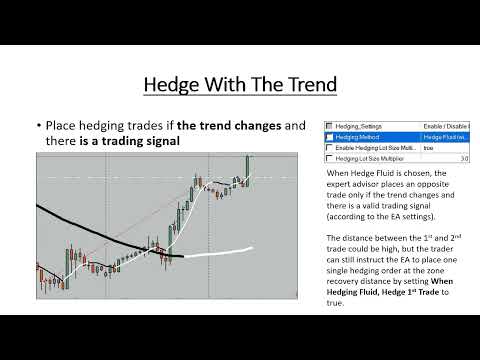
Differences between MT5 EA version compared to MT4 EA
- has an option to disable BreakEven - the BreakEven (pips) value will still be used if Close Losers & Set BreakEven for Winners is an option to deal with baskets of trades that reach Minimum Profit
- had the trailing option for Close Losers & Set BreakEven for Winners removed (the MT5 version places the StopLoss at BE without trailing the price)
- has the option to close all trades if their (negative) profits reach the Maximum Loss amount
- offers the posibility to remove itself from the chart, close MT5 or do nothing if any of the Close Trades When/If is triggered according to trader's settings
Auto Recovery EA FAQ
What is a zone recovery strategy?
A zone recovery strategy is a hedging trading method that opens opposite trades at predefined price levels in order to recover losing positions when the market reverses or breaks out.
Does Auto Recovery EA use martingale?
No. The EA uses a hedging recovery system instead of traditional martingale averaging strategies. Traders can control hedge lot progression using custom multiplier settings.
Can I use Auto Recovery EA on MT4 and MT5?
Yes. The expert advisor is compatible with both MetaTrader 4 and MetaTrader 5 trading platforms.
Can the EA manage manual trades?
Yes. By setting the Magic Number to -1, the EA can manage and hedge manually opened forex trades.
RobotFX Auto Recovery zone recovery Video Tutorial
What you will learn in this video: you will understand how the RobotFX Auto
Recovery Expert Advisor manages losing trades using a structured dynamic hedging
system designed to reduce drawdown and avoid stop-loss liquidation under adverse
market conditions. The video explains how the Recovery Zone is calculated and
how hedging orders are progressively introduced to counteract floating losses
while maintaining overall directional control of the strategy. You will also
learn the difference between hedging-based recovery and Martingale systems,
including why controlled hedging is considered a more risk-managed approach for
long-term trading stability.
In addition, the walkthrough covers how key risk management parameters such as
maximum orders, hedge multipliers, and minimum profit settings influence trade
recovery behavior and overall account protection. You will see how the EA
automates break-even adjustments, manages slippage during volatile conditions,
and handles gap risk in fast-moving markets. Finally, the video demonstrates how
settings like magic number, lot sizing logic, and recovery configuration can be
optimized to balance aggressiveness and capital preservation when running fully
automated trading strategies. You will have to watch
the rest of the videos
too if you want to master this trading tool.
Auto Recovery EA for MT4 and MT5 is suitable for forex traders looking for automated hedge recovery, drawdown reduction, recovery zone trading and advanced trade management on MetaTrader platforms.